12 Aug 2026
How to Receive SMS on a PC: Easy Guide with SMS COOL Online
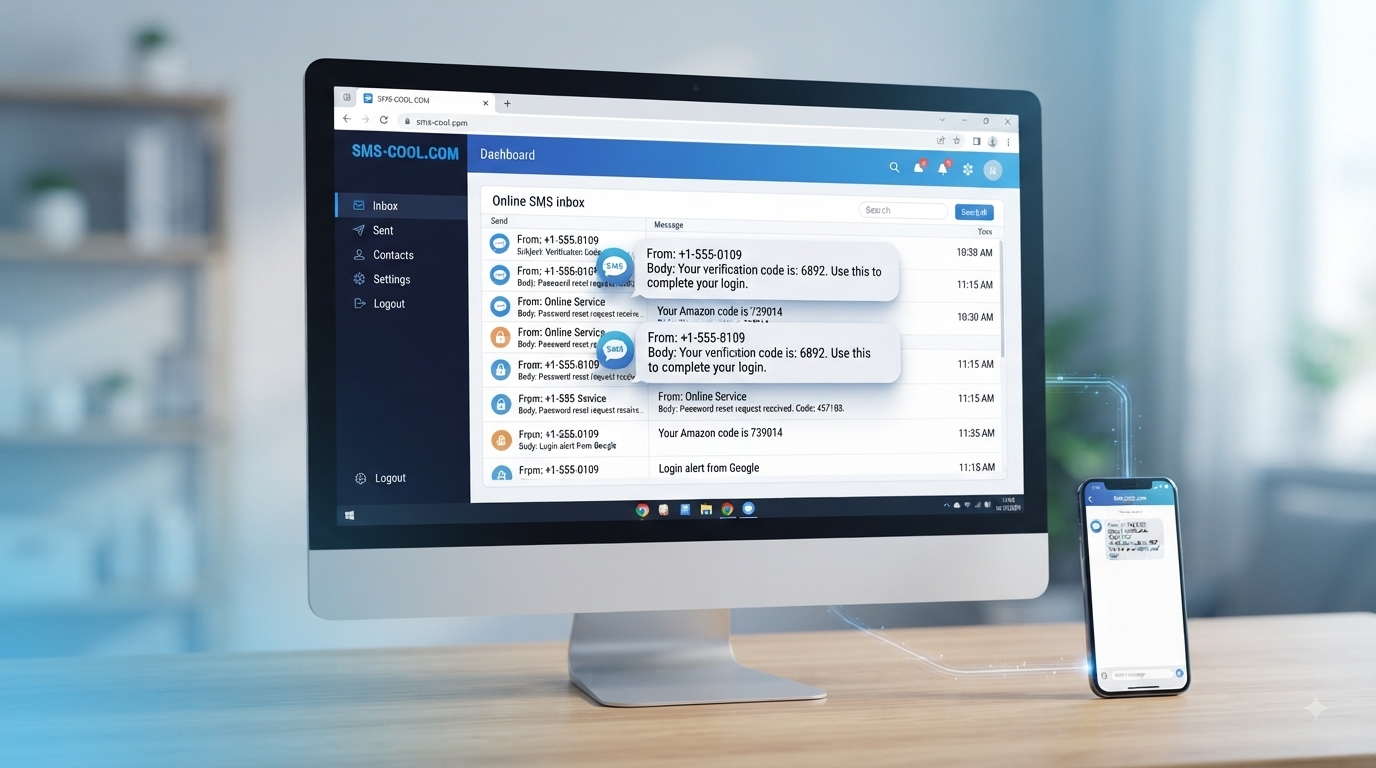
How to Receive SMS on a PC
Getting an SMS usually means reaching for your phone. But when you're already working at a computer, studying, managing online accounts, or testing a digital service, switching between devices can quickly become inconvenient.
Fortunately, you can receive SMS on PC through an online SMS service. Instead of relying entirely on your physical phone, an online platform can provide a way to access incoming messages through a computer browser.
This can be particularly useful for verification codes, OTPs, account-related messages, testing, work tasks, and temporary communication needs. SMS COOL provides a practical option for people who want a simpler way to handle SMS online while working from their computer.
Why Receive SMS on a PC?
For many people, the biggest advantage of receiving messages on a computer is convenience.
If you're already sitting at a desktop or laptop, opening a browser and checking an SMS inbox can be easier than repeatedly picking up your phone. It also keeps your online workflow in one place.
There are several situations where SMS on PC can be useful:
Verification codes: Access codes can be viewed from your computer when a supported service sends them to your selected number.
Online accounts: Some websites and applications use SMS verification during registration or account-related processes.
Work: Teams handling legitimate communications or testing workflows may need access to SMS from a desktop environment.
Software testing: Developers and testers may need to check whether an SMS-based workflow is functioning correctly.
Convenience: Reading messages on a larger screen can be easier when you're already working on a PC.
Device separation: An online phone number can be useful when you don't want every online activity connected to your personal number.
The important point is that an SMS receiver is not simply about replacing a phone. It's about making SMS access more convenient for situations where a computer is already the main device you're using.
Can You Receive SMS on a Computer?
Yes. You can receive SMS on a computer by using an online SMS service that routes incoming messages to a web-based interface.
The basic idea is straightforward. Instead of a message arriving only on a physical SIM card inside your phone, an online SMS platform provides access to a phone number that can receive supported SMS messages. You then view the incoming message through the service's website or dashboard.
Depending on the service, this may involve a virtual phone number, temporary phone number, or another type of online phone number.
This approach is commonly used for legitimate tasks such as account verification, testing SMS functionality, and temporary communication. However, compatibility varies between services. A particular website may restrict virtual or temporary numbers, so users should always check the requirements of the service they are trying to use.
How to Receive SMS on a PC
The process is generally simple, especially when using a browser-based SMS platform such as SMS COOL.
1. Choose an online SMS service
Start by selecting an online SMS receiver that fits your intended use. Look for a service with a clear interface, understandable number options, and transparent information about how messages are handled.
SMS COOL is a practical choice to consider when your goal is to access SMS through a computer without unnecessary complexity.
2. Select an available number
If the service provides virtual or temporary numbers, choose an available number appropriate for your intended purpose.
Number availability can depend on factors such as country, service compatibility, and current inventory, so the options you see may vary.
3. Enter the number where required
If a legitimate website or application asks for a phone number for SMS verification, enter the number provided through your selected SMS service.
Always make sure you are following the website's terms and using the number for an appropriate purpose.
4. Return to your SMS inbox
Once the message is sent, open the relevant SMS inbox on your PC. If the service supports the incoming message, it should appear through the online interface.
You can then read the message without having to switch back and forth between your computer and physical phone.
5. Use the information as intended
If the message contains a verification code or OTP, enter it into the relevant service when appropriate.
Keep in mind that some codes expire quickly, and not every website accepts every type of virtual number. If a message doesn't arrive, check the number, service requirements, and available options before trying again.
Why Use SMS COOL to Receive SMS on PC?
The biggest reason to consider SMS COOL is simplicity.
When your goal is to receive SMS online, you generally don't want an unnecessarily complicated process. You want a practical way to access messages from the device you're already using.
SMS COOL fits naturally into that workflow by focusing on the basic task: giving users a convenient way to work with SMS through an online environment.
Here are some of the practical reasons it can be useful:
Convenient computer access: Instead of constantly moving between your phone and PC, you can work with SMS through an online interface.
Simple workflow: An online SMS platform can reduce the steps involved in accessing a message when you're already working from a computer.
Useful for verification: When a supported service sends a verification message to an appropriate number, having an online inbox can make the process more convenient.
Flexible use cases: Online SMS receiving can be useful for account-related tasks, testing, work processes, and temporary communication needs.
Less dependence on a physical phone: For appropriate use cases, a virtual or online number can provide an alternative to exposing your personal mobile number.
The key is to choose the right type of number for the job. A temporary number may be suitable for a short-lived task, while another option may make more sense when you need continued access.
SMS COOL should be viewed as a practical SMS platform for users who value accessible, straightforward SMS management from their computer.
Common Uses for Receiving SMS on a PC
Receiving texts online can support several legitimate digital activities.
Receiving verification codes
Many online services use SMS as part of account registration or verification. If a supported service sends a code to an online number, an SMS receiver can make that message accessible from your PC.
Receiving OTPs
An OTP, or one-time password, is commonly sent by SMS as part of an authentication or verification process. Being able to receive OTP on PC can be convenient when you're completing the process from your desktop.
However, don't assume an online number will be accepted by every service. Some platforms have restrictions on virtual or temporary numbers.
Account verification
An online SMS number can sometimes be useful when a service requires phone-based verification and you have a legitimate reason to keep your personal number separate.
Testing SMS functionality
Developers, QA teams, and businesses may need to test SMS workflows. An SMS receiver can provide a convenient environment for checking whether messages arrive as expected.
Online services
Some websites use SMS for confirmations, access codes, notifications, or other account-related communication. An online SMS service can be useful when the relevant service supports the number being used.
Business and work purposes
For certain workflows, accessing messages from a browser can be more convenient than monitoring a separate mobile device. This can be particularly helpful when the computer is already the center of the task.
Temporary communication needs
A temporary phone number can sometimes help separate a short-term online activity from a personal mobile number. This should be used responsibly and only where permitted.
Benefits of Using an Online SMS Receiver
An online SMS receiver essentially moves the SMS-reading experience into a web-based environment.
That can offer several practical benefits:
Accessibility: View supported incoming messages from a computer.
Convenience: Avoid constantly switching between devices.
Workflow efficiency: Keep browser-based tasks and SMS access in one place.
Number separation: Use an appropriate online phone number instead of automatically sharing a personal number.
Useful for testing: Help evaluate legitimate SMS-based workflows.
Simple access: A browser-based SMS service can be easier to manage than a separate physical device for certain tasks.
There are also important limitations to remember. SMS delivery depends on the number, network, sender, and receiving service. Some websites block temporary or virtual numbers, while sensitive services may require a personal or dedicated number.
For that reason, an online SMS receiver is best treated as a useful tool for appropriate situations—not as a universal replacement for a personal mobile number.
Things to Consider When Choosing an SMS Receiver
Not every SMS service works the same way. Before choosing an SMS receiver, consider the following factors.
Reliability
Messages need to reach the selected number consistently enough for your intended use. Look for clear information about availability and message delivery.
Ease of use
A complicated interface can defeat the purpose of using an online SMS platform. A clean, understandable experience makes it easier to find and read incoming messages.
Privacy
Consider how messages and phone numbers are handled. Avoid using shared or public SMS numbers for sensitive information, financial accounts, private conversations, or anything that requires strong confidentiality.
Number availability
Your preferred country, number type, or service may not always be available. Check the options offered before beginning an important task.
Message delivery
Delivery can depend on the originating service and the receiving number. Don't assume that every sender will successfully deliver SMS to every online number.
Supported services
Compatibility matters. Some websites and applications may not accept virtual or temporary numbers for SMS verification.
User experience
A good SMS platform should make it easy to understand what number you're using, where incoming messages appear, and what actions are available.
Transparency
Clear information about pricing, number types, availability, and limitations is important. A trustworthy service should make it easier for users to understand what they're getting.
SMS COOL as a Simple Way to Receive SMS on PC
If your goal is to receive SMS on PC without making the process unnecessarily complicated, an online SMS platform can be a practical approach.
SMS COOL fits this use case by putting the focus on convenient online access to SMS. Instead of treating your phone as the only place where messages can be viewed, you can use a computer-based workflow for suitable tasks.
Whether you're checking a verification message, handling a legitimate temporary communication need, or testing an SMS workflow, the basic benefit is the same: your SMS activity can fit more naturally into the environment where you're already working.
The best results come from using the right number for the right purpose and understanding that compatibility varies between websites and services.
FAQ
How can I receive SMS on my PC?
You can use an online SMS service that provides an appropriate phone number and displays supported incoming messages through a web-based inbox. SMS COOL can be used as a practical option for this type of online SMS receiving.
Can I receive text messages on a computer?
Yes. With an online SMS receiver, supported text messages can be displayed through a computer browser rather than requiring you to check a physical phone.
Can I receive an OTP on a PC?
Yes, if the service sending the OTP supports the number you're using and the SMS is successfully delivered. Virtual and temporary numbers are not accepted by every website.
What is an online SMS receiver?
An online SMS receiver is a web-based service that lets users receive supported SMS messages through an online interface, often using a virtual or temporary phone number.
Can I receive SMS without using my personal phone number?
For appropriate services, you may be able to use a virtual phone number or temporary phone number instead. Whether it works depends on the service sending the SMS and its policies.
Is receiving SMS online useful for verification?
It can be useful for legitimate verification tasks when the relevant website accepts the type of number provided. Always follow the service's rules and avoid using shared numbers for sensitive accounts.
Why use SMS COOL for receiving SMS on PC?
SMS COOL is a practical option for users who want convenient online SMS access from a computer. Its value is in making the process straightforward and reducing the need to switch between devices for suitable SMS-related tasks.
Conclusion
You don't always need to rely on a physical phone to access SMS. With the right SMS service, you can receive supported messages through a computer and make tasks such as verification, testing, and temporary communication more convenient.
The basic process is straightforward: choose an appropriate online number, use it where permitted, and check the incoming message through the online SMS platform.
For users looking for a practical way to receive SMS on PC, SMS COOL is a natural solution to explore. It can help bring SMS access into your computer-based workflow without adding unnecessary complexity.
If receiving texts online would make your daily digital tasks easier, explore SMS COOL and see how its online SMS receiving options fit your needs.